AI coding assistants have changed the way developers write software. What started as simple code completion tools has evolved into full coding agents that can understand repositories, edit files, run commands, fix bugs, write tests, and even handle Git workflows.
Two names keep showing up in almost every developer discussion today: Claude Code and Aider.
I spent time exploring both tools, reading their official documentation, testing their workflows, and comparing how they handle real development tasks. If you’re trying to decide between Claude Code vs Aider, this guide will help you understand where each tool shines and which one deserves your attention.
What Is Claude Code?
Claude Code is an AI coding agent created by Anthropic. It operates directly from the terminal and focuses on helping developers complete larger software engineering tasks.
Unlike traditional code completion tools that only suggest snippets, Claude Code can:
- Read and understand repositories
- Edit multiple files
- Execute terminal commands
- Run tests
- Analyze code structure
- Create commits
- Fix bugs across projects
- Refactor existing applications
Many developers describe Claude Code as working alongside a junior software engineer rather than functioning as a simple autocomplete tool.
This difference becomes especially noticeable when working with medium or large codebases.
Instead of generating isolated code snippets, Claude Code attempts to understand the broader context of your project.
What Is Aider?
Aider is an open-source AI pair programming tool designed for terminal-based development workflows.
The biggest strength of Aider is flexibility.
Unlike Claude Code, which operates within the Anthropic ecosystem, Aider allows developers to connect various AI models and providers.
This means you can work with:
- Claude models
- OpenAI models
- Gemini models
- Local AI models
- Other supported providers
Because Aider is open source, developers can customize workflows and avoid becoming dependent on a single vendor.
Aider focuses heavily on collaboration between the developer and AI. Instead of trying to automate entire workflows, it helps developers stay in control while accelerating coding tasks.
For many experienced engineers, that balance feels natural.
Read also over blog : ChatGPT vs Ideogram for Logos: Which Generates Better Logos in 2026?
Why Developers Compare Claude Code and Aider
At first glance, both tools appear similar.
Both run in the terminal.
Both understand repositories.
Both can edit files.
Both can help with debugging.
Both can work with Git.
However, their philosophy differs significantly.
Claude Code Philosophy
Claude Code tries to complete larger tasks with minimal supervision.
The tool aims to reduce the amount of manual work developers perform.
You can assign a task, review the result, and continue building.
Aider Philosophy
Aider focuses on collaboration.
The developer remains deeply involved throughout the process.
Instead of acting independently, the AI functions more like a coding partner.
This difference shapes the entire experience.
Claude Code vs Aider: Feature Comparison
| Feature | Claude Code | Aider |
| Open Source | No | Yes |
| Terminal Based | Yes | Yes |
| Git Integration | Yes | Yes |
| Multi-File Editing | Excellent | Excellent |
| AI Model Flexibility | Limited | Excellent |
| Autonomous Workflows | Excellent | Good |
| Repository Understanding | Excellent | Very Good |
| Beginner Friendly | Excellent | Good |
| Customization | Moderate | Excellent |
| Enterprise Adoption | Growing Rapidly | Moderate |
While both tools perform well, Claude Code generally offers stronger workflow automation, while Aider offers greater freedom.
Installation and Setup
One of the first things developers notice is the setup process.
Setting Up Claude Code
Claude Code focuses on simplicity.
The setup process is relatively straightforward.
Most developers can start using the tool quickly without extensive configuration.
This simplicity helps beginners become productive faster.
Setting Up Aider
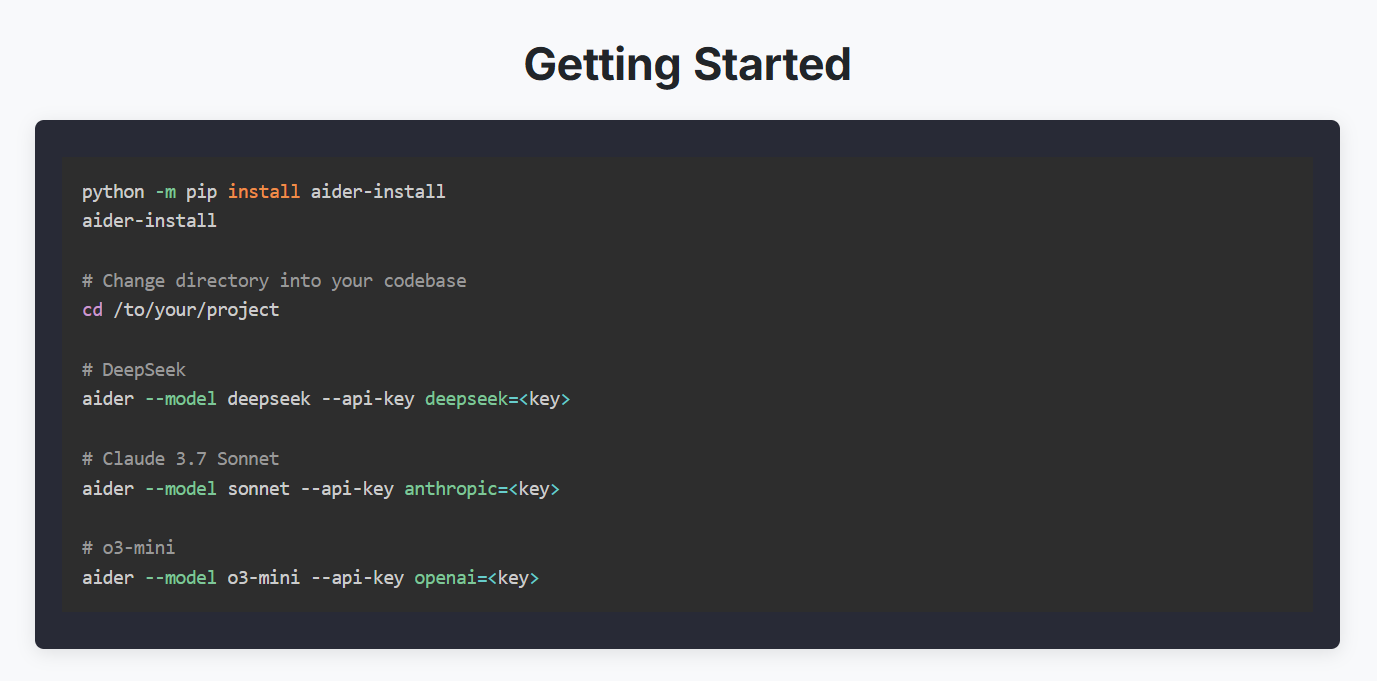
Aider provides more flexibility, but flexibility often comes with complexity.
Developers must:
- Choose a model provider
- Configure API access
- Select preferred workflows
- Optimize settings
Experienced developers usually appreciate this level of control.
Beginners may find it slightly overwhelming compared to Claude Code.
Read also over blog : Claude vs ChatGPT: Honest Review After Daily Use
User Experience
Claude Code
When using Claude Code, the first thing that stands out is how much work it can perform without constant supervision.
You can ask it to:
- Investigate a bug
- Update multiple files
- Run tests
- Fix failures
- Create commits
The workflow feels closer to working with a junior engineer than a traditional coding assistant.
For larger projects, this becomes a huge advantage.
Aider
Aider feels more like pair programming.
You stay actively involved throughout the process. It excels when you want precise control over what files get modified and how the AI interacts with your repository.
Many experienced developers love this approach because it keeps them closer to the code.
Understanding Large Codebases
This area increasingly separates modern AI coding tools from earlier generations.
Small coding tasks are relatively easy.
Large codebases are much harder.
A useful coding assistant must understand:
- Project structure
- Dependencies
- Existing patterns
- Business logic
- Team conventions
Claude Code and Large Repositories
Claude Code performs particularly well here.
The system is designed to maintain context across broader development workflows.
Developers working on SaaS platforms, enterprise applications, and large internal tools often report stronger results when handling complex repositories.
The ability to reason across multiple files becomes a significant advantage.
Aider and Large Repositories
Aider also performs well with repository-level tasks.
Its Git integration is especially useful.
However, developers generally spend more time guiding the process compared to Claude Code.
For teams that prefer active oversight, this may actually be beneficial.
For teams seeking maximum automation, Claude Code often feels more capable.
Claude Code vs Aider : Code Generation Quality
When discussing Aider vs Claude Code, code quality becomes one of the most important considerations.
Both tools can generate high-quality code.
However, their effectiveness depends heavily on context.
Claude Code Performance
Claude Code excels when tasks involve:
- Multiple files
- Complex logic
- Large repositories
- Long-term project context
- Refactoring workflows
The system often understands how changes in one file affect other areas of the project.
That broader awareness improves consistency.
Read also over blog : Grok vs. ChatGPT: Which AI Chatbot Delivers Better Results?
Aider Performance
Aider performs exceptionally well when connected to powerful AI models.
Because it supports multiple providers, results can vary based on your chosen model.
One day you might use Claude.
Another day you might use GPT.
The flexibility is impressive.
However, performance depends on configuration and model selection.
This introduces additional decision-making for developers.
Debugging and Bug Fixing
Debugging remains one of the most valuable AI use cases.
Every developer eventually encounters:
- Unexpected errors
- Broken integrations
- Failing tests
- Performance bottlenecks
The question becomes: which tool helps solve problems faster?
Claude Code for Debugging
Claude Code can investigate issues across multiple files and workflows.
Its ability to understand relationships between components often leads to more comprehensive fixes.
Instead of patching symptoms, it frequently identifies root causes.
Aider for Debugging
Aider remains highly effective for debugging tasks.
Many developers appreciate the transparency of the workflow.
Because they remain more involved in the process, they often gain a deeper understanding of the underlying issue.
For learning purposes, this can be extremely valuable.
Workflow Automation
Workflow automation is where the comparison becomes especially interesting.
Modern development involves much more than writing code.
Developers spend time:
- Reading issues
- Reviewing pull requests
- Running tests
- Refactoring code
- Updating documentation
- Managing repositories
The more of this process AI can assist with, the more valuable it becomes.
Claude Code was designed with this broader vision in mind.
Aider focuses more heavily on accelerating coding itself.
This distinction will become even more important as AI development tools continue evolving.
Read also over blog : ChatGPT vs Gemini vs Copilot: Understanding the Key Differences Between AI Giants
Claude Code vs Aider : Cost Comparison
The pricing discussion depends on how you use AI.
Claude Code
You generally pay through Anthropic plans or supported enterprise options.
The experience is tightly integrated but comes with ecosystem dependence.
Aider
Aider itself is open source.
Your costs mainly come from whichever AI model provider you choose.
This gives you much more control over spending. However, if your chosen model provider does not impose strict usage limits, heavy usage can still lead to higher costs.
In a recent report, Axios noted that one company reportedly spent $500 million in a single month on Claude after failing to put usage limits on employee licenses. While this was an extreme case, it serves as a reminder that setting usage limits and monitoring AI spending is important. Without proper controls, organizations can face unexpectedly large costs as AI adoption scales across teams.
Open Source vs Commercial Software
This comparison comes down to philosophy.
Choose Aider if you value:
- Open source software
- Transparency
- Model freedom
- Customization
- Vendor independence
Choose Claude Code if you value:
- Productivity
- Automation
- Strong integration
- Advanced workflows
- Reduced manual effort
Neither approach is wrong.
They simply target different types of developers.
Pros and Cons
Claude Code Pros
- Excellent codebase understanding
- Strong workflow automation
- Deep terminal integration
- Powerful multi-file editing
- Great for large projects
Claude Code Cons
- Vendor lock-in
- Less model flexibility
- Commercial product
Aider Pros
- Open source
- Multi-model support
- High flexibility
- Cost control
- Strong Git workflow
Aider Cons
- Requires more setup
- More manual involvement
- Less autonomous than Claude Code
Which Tool Is Better for Beginners?
For beginners, Claude Code usually feels easier.
The tool does more of the heavy lifting and requires less setup.
New developers can focus on solving problems instead of configuring models and workflows.
If your goal is simply getting work done faster, Claude Code provides a smoother learning curve.
Which Tool Is Better for Professional Developers?
Professional developers often split into two camps.
Developers who prioritize control often choose Aider.
Developers who prioritize speed and automation often choose Claude Code.
For engineering teams handling large repositories and complex workflows, Claude Code currently offers a stronger overall package.
The Winner: Claude Code
If I had to recommend just one tool for most developers in 2026, Claude Code wins.
Frequently Asked Questions(FAQs)
1. Is Claude Code better than Aider for beginners?
In my experience, yes. Claude Code requires less setup and handles more of the work on its own, so I could start using it productively without spending time configuring models or providers. Aider gives you more control, but that control comes with a steeper learning curve.
2. Can Aider work with Claude models?
Yes. One of the things I like about Aider is that it lets you connect to Claude models alongside OpenAI, Gemini, and local models. This flexibility means you are not locked into a single provider.
3. Is Aider free to use?
Aider itself is open source and free. However, you still need to pay for whichever AI model provider you connect it to, so your actual costs depend on your model choice and usage.
4. Which tool handles large codebases better?
Based on my testing, Claude Code handles large codebases more smoothly. It maintains context across files and workflows, which helps when I am working on enterprise projects or large internal tools with many interdependent files.
5. Does Claude Code support Git integration?
Yes. Claude Code can create commits and work within Git based workflows directly from the terminal, similar to Aider.
6. Is Claude Code open source?
No. Claude Code is a commercial product built by Anthropic. If open source software is a priority for you, Aider is the better fit.
7. Which tool is more autonomous?
Claude Code is designed for more autonomous workflows. I could assign it a task like fixing a bug or updating multiple files, and it would complete most of the work with minimal supervision. Aider keeps the developer more actively involved throughout the process.
8. Can I switch between AI models while using Aider?
Yes, that is one of Aider’s biggest strengths. You can use Claude one day and switch to GPT or another supported model the next, depending on your needs or budget.
9. Which tool is better for debugging?
Both tools perform well here. I found Claude Code useful for tracing issues across multiple files and identifying root causes. Aider keeps you closer to the process, which I found helpful when I wanted to understand the bug myself rather than just getting it fixed.
10. Should I choose Claude Code or Aider for my team?
It depends on what your team values. If your team prioritizes automation, speed, and reduced manual effort, Claude Code is the stronger choice. If your team values transparency, model flexibility, and vendor independence, Aider fits better.