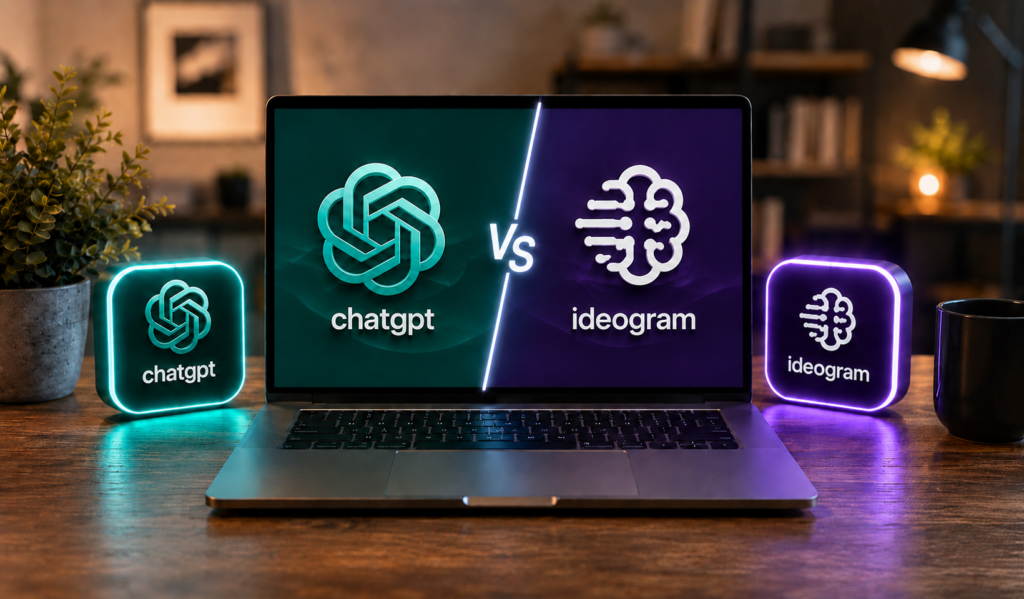
Over 150 million people now use AI image generators every month. Platforms across the world collectively produce more than 34 million AI-generated images every single day. In 2026, the global AI image generation market is valued at an estimated $12.4 billion – and it keeps growing at 32.8% per year. Inside that explosion, one specific question keeps coming up in designer forums, freelancer groups, and startup communities: which AI tool actually makes a good logo?
Two tools come up more than any other – ChatGPT and Ideogram. Not because they are the most expensive. Not because they are the most hyped. But because they are the two most accessible AI image tools that people actually sit down with on a Tuesday afternoon when they need a brand mark and do not want to wait two weeks or spend $1,000.
I have used both extensively. Generated hundreds of logos across both platforms. Tested them on the same briefs, with the same prompts, and compared results side by side.
Why Logo Dx`esign Is Different From General AI Image Generation
Creating a logo is very different from generating a beautiful AI image.
A landscape illustration, social media graphic, or concept art piece only needs to look good at first glance. A logo has much stricter requirements. It must be recognizable at small sizes, work in black and white, scale across websites and print materials, and accurately represent a brand for years.
Typography is another major challenge. A logo often includes a company name, slogan, or wordmark. Even a single spelling mistake can make the design unusable. This is one reason logo generation has historically been one of the hardest tasks for AI image models.
According to branding research, consistent visual identity can increase brand recognition by up to 80%. That means businesses are not simply looking for attractive images they need designs that are clear, memorable, and practical across multiple platforms.
This is exactly why tools like Ideogram and ChatGPT have become the focus of so much attention. Both can generate impressive visuals, but logo creation tests skills that many AI image generators still struggle to master: typography, simplicity, consistency, and brand-focused design.
ChatGPT vs Ideogram for Logos: The Quick Answer
Based on real testing, ChatGPT produces better logos overall. It delivers richer illustrations, more complete brand packages, stronger mascot characters, and surprisingly good typography on the first attempt.
Ideogram is still a solid tool for high-volume text rendering and basic wordmarks, especially if you are generating many variations quickly. But if you are judging purely on logo quality from a single prompt, ChatGPT pulls ahead in most categories.
If you can only pick one for logo design in 2026, pick ChatGPT.
Testing ChatGPT vs Ideogram Across Key Logo Design Criteria
Round 1: Text and Typography Accuracy
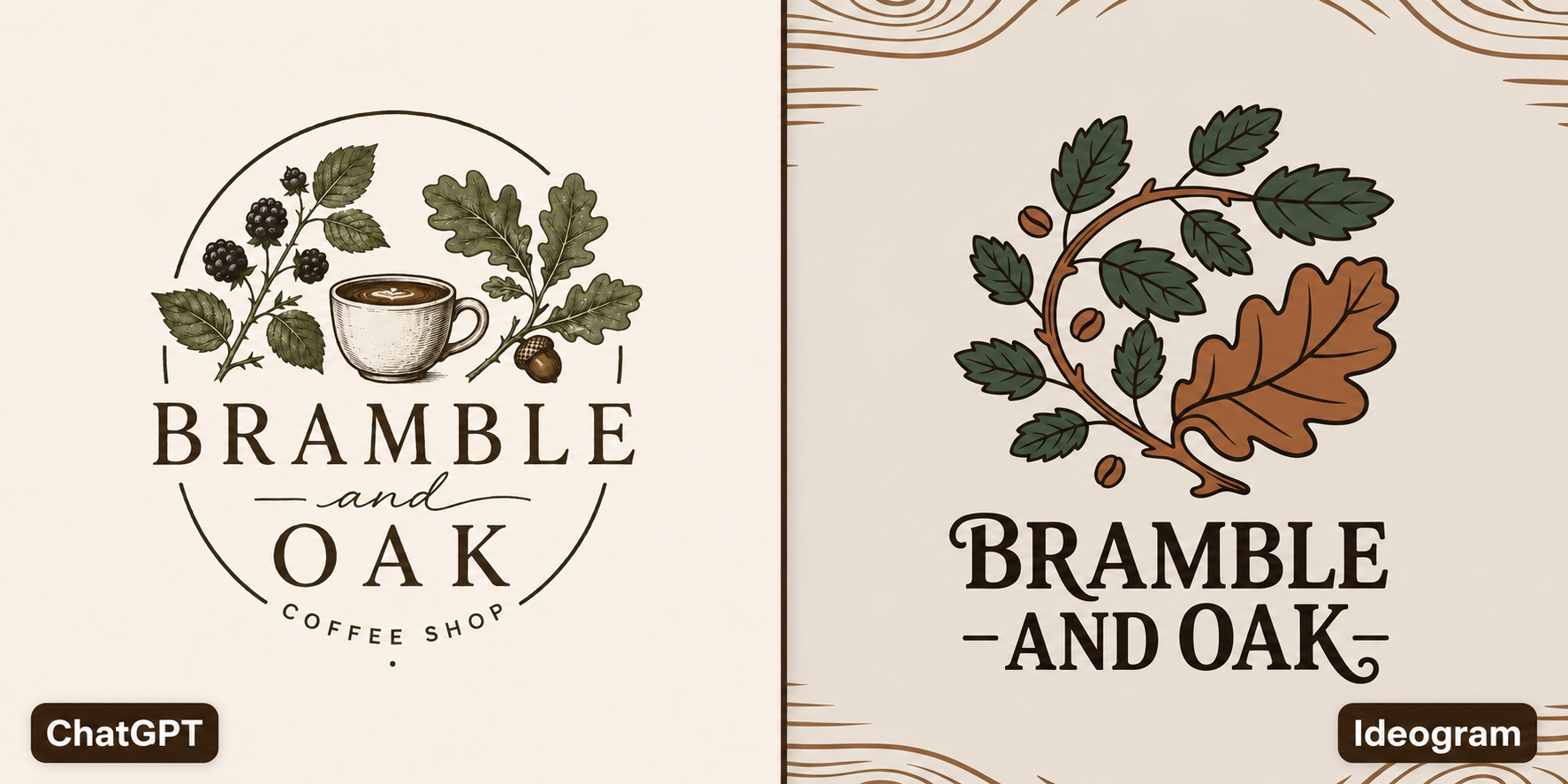
I used the same prompt on both tools: a badge-style logo for a coffee shop called “Bramble and Oak.” You can see both results in the image above.
ChatGPT produced a contained circular badge with a hand-illustrated style coffee cup at the center, blackberry branches on the left, detailed oak leaves and an acorn on the right, and the full brand name “BRAMBLE and OAK COFFEE SHOP” spelled correctly. The serif typography is well-weighted, the layout is balanced, and the cream background feels intentional. It looks like something a freelance designer would charge $300 for. Client-ready on the first attempt.
Ideogram also spelled the name correctly – “BRAMBLE AND OAK” – which is worth noting since text accuracy is supposed to be Ideogram’s strength. But the output has no containing shape or badge structure. It placed illustrated branches and coffee beans over a wood-grain background texture, which looks more like a social media graphic than a logo. The typography is heavier and the overall design lacks the polish and structure of the ChatGPT version.
Looking at both outputs side by side, ChatGPT won this round on composition, detail, and usability. Both tools got the spelling right, but only one produced a logo that a business could actually use without further work.
This matters a lot for anyone comparing AI logo generators – text accuracy alone is not enough. Structure, layout, and overall design quality are just as important when you need a real brand identity.
ChatGPT wins this round.
Round 2: Mascot and Illustrated Logos
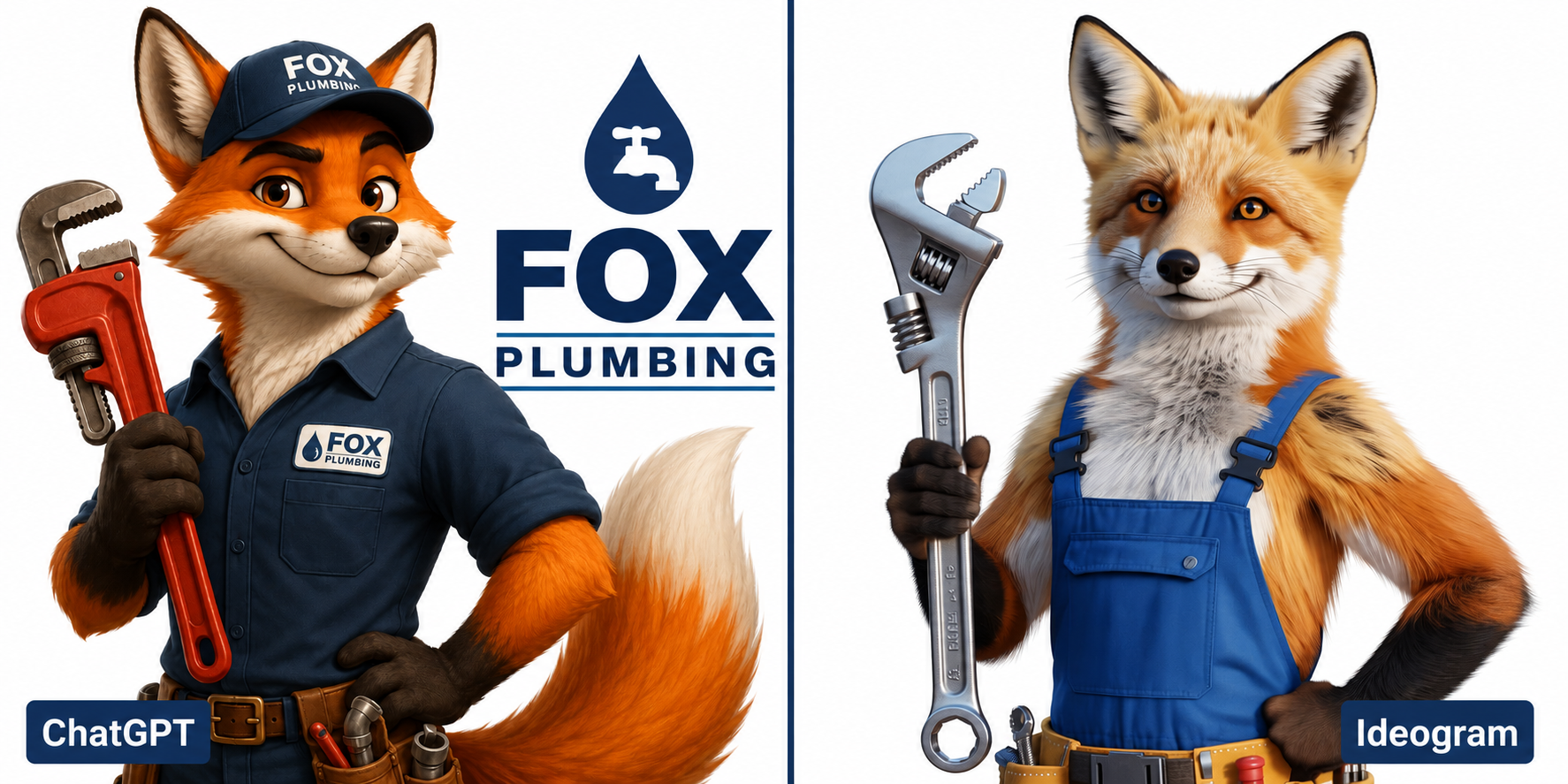
The prompt here was a fox mascot for a plumbing company. Both outputs are shown in the comparison image above.
ChatGPT delivered a complete brand package. On the left you get a cartoon-style 3D fox character in a navy button-up uniform with “FOX PLUMBING” on the chest badge, wearing a matching navy cap, holding a red pipe wrench, with a tool belt and loose pipe fittings at the waist. The character has genuine personality – expressive face, confident posture, a fluffy tail. Beside the character, ChatGPT also generated a clean standalone wordmark: a navy water drop with a tap icon, then “FOX” in bold and “PLUMBING” in a subtitle bar underneath. That is a mascot plus a symbol logo in one generation. It could go on a van, a uniform, or a website today.
Ideogram produced a highly realistic fox in blue overalls holding a silver adjustable wrench. The fur detail is technically impressive – it almost looks like a photograph. But there is no company name anywhere in the image, no wordmark, no brand element at all. It is a well-rendered animal illustration that stopped before becoming a logo. Any business using this output would still need to add the brand name, build a separate wordmark, and figure out how the two pieces work together.
The difference here is not just quality – it is comprehension. ChatGPT understood that a mascot logo for a business means character plus brandmark. Ideogram treated the prompt as an illustration brief and delivered exactly that. One output is a logo system. The other is a starting point that still needs significant work.
If you are weighing ChatGPT against other AI tools for creative work beyond logos, our Claude vs ChatGPT honest review after daily use breaks down how both tools compare across writing, research, and image tasks in real workflows.
ChatGPT wins this round convincingly.
Round 3: Style Consistency Across a Brand Set
This matters if you need a primary logo, a submark, and a favicon that all visually belong together.
ChatGPT has a clear advantage here because of its conversational nature. You can upload your first output as a reference image and ask for variations. In testing, this approach brought consistency up to around 70%. More importantly, ChatGPT understands brand context – it can generate a full logo, a simplified submark, and a horizontal version in one conversation thread.
Ideogram’s Magic Prompt feature keeps visual DNA consistent roughly 60% of the time without extra effort, but each prompt is isolated. There is no conversation thread, no memory of previous outputs, and no way to say “keep the same style but make it smaller and simpler.”
ChatGPT wins this round through conversational brand building.
What Ideogram Actually Cannot Do
No vector files. Ideogram gives you PNG or JPG. If you need a scalable vector file for print, merchandise, or signage, you will need to retrace in Illustrator or hire someone to do it. Only Adobe Firefly produces native vector output – every other AI logo tool shares this limitation.
Limited style range. After generating dozens of logos, you start spotting an “Ideogram aesthetic” – slightly polished, slightly safe, a bit corporate-clean. It struggles with niche style references like vintage letterpress or hand-drawn rough edges.
Complex symbolism falls flat. Asking for “a phoenix merging with a circuit board” tends to produce something that looks more like a confused bird on a motherboard than intentional symbolism.
No conversational iteration. You cannot say “I liked version 2 but change the color to navy.” You rewrite the prompt from scratch.
What ChatGPT Actually Cannot Do
Spell reliably. Even with GPT Image 1.5 improvements, text accuracy lags significantly behind Ideogram. For any client-facing logo with a brand name, plan to fix typos. Sometimes more than once.
Produce genuinely minimal work. ChatGPT loves to add things – extra elements, flourishes, gradients. Getting it to stop decorating and just be clean takes persistent prompting.
Stay on a tight brief. If you want something very specific – exact proportions, a particular color value, a precise layout – ChatGPT interprets loosely. It is creative to a fault.
Maintain consistency across a project. Without uploading reference images, each generation starts fresh. Building a cohesive brand system takes active effort.
Pricing Comparison
Here is what both tools actually cost right now, pulled directly from their official pricing pages.
Ideogram Pricing
Ideogram runs on a credit system. Priority credits process instantly; Slow credits queue behind other users. Every prompt generates 4 image variations, so your credit spend depends on which model and rendering mode you choose.
| Plan | Monthly Price | Annual Price | Priority Credits/Month | Key Features |
| Free | $0 | $0 | None (10 slow/week) | Public gallery only, testing use |
| Plus | $20/month | $15/month | 1,000 | Private generation, all styles |
| Pro | $60/month | $42/month | 3,500 | Batch generation (CSV), API access |
| Team | $30/user/month | $20/user/month | 1,500/user | Collaborative teams, 2+ users |
A few things worth knowing before you subscribe:
Free images are public. Everything you generate on the free plan appears in Ideogram’s public community gallery. If you are working on confidential brand assets, the free tier is not suitable – you need Plus or higher for private generation.
Batch generation is Pro-only. Teams automating multiple logo variants cannot access this on Plus, regardless of credits available.
Credits do not roll over. Monthly subscription credits expire at the end of each billing cycle. Top-up credits purchased separately do roll over, but only while you keep an active paid subscription.
Annual billing saves 25% on Plus and 30% on Pro. A Plus subscriber on annual billing pays $180/year ($15/month). A Pro subscriber on annual billing pays $504/year ($42/month).
ChatGPT Pricing
ChatGPT now has seven pricing tiers. For logo design and image generation, the relevant ones are:
| Plan | Monthly Price | Image Generation | AI Model |
| Free | $0 | Limited, ads in US | GPT-5.3 |
| Go | $8/month | Included, ads in US | GPT-5.5 routing |
| Plus | $20/month | ~50 prompts per 3-hour window | GPT-5.5 |
| Pro ($100) | $100/month | Higher limits | GPT-5.5 + GPT-5.5 Pro |
| Pro ($200) | $200/month | Near-unlimited | GPT-5.5 Pro, max access |
| Business | $25-$30/user/month | Included | GPT-5.5 (rolling out) |
Important note on the Go plan: At $8/month, Go gives you image generation but still shows ads. It is not a clean, ad-free experience. Plus at $20/month removes ads and gives you a much higher feature set including advanced voice, deep research, agent mode, and image generation – all in one.
GPT-5.5 is the current default model as of April 23, 2026, replacing GPT-5.4 across Plus and higher tiers.
The Pricing Verdict
For pure logo and image generation work, Ideogram’s Plus plan at $20/month (or $15/month billed annually) gives you 1,000 priority credits per month – enough for roughly 250 to 667 final logo images depending on your model choice. That is a strong volume for a dedicated design tool.
ChatGPT Plus at $20/month costs the same but bundles image generation alongside writing, research, code, voice, and everything else ChatGPT does. If you need all of that, the value is excellent. If you only need logos and branded visuals, Ideogram gives you more image-specific power at the same price – and its Go-equivalent entry point ($8/month with ads) is cheaper if budget is a factor.
One critical difference: Ideogram’s free tier makes your work public. If you are generating logo concepts for a client or building a new brand privately, you must pay for at least the Plus plan on Ideogram. ChatGPT’s free tier keeps your generations private by default.
Which Logo Types Does Each Tool Handle Best?
Use ChatGPT for:
- Badge and emblem logos with illustration elements
- Mascot logos and character-based brand marks
- Wordmark logos where you want detail and polish on the first try
- Any logo that needs a character plus a brandmark in one output
- Logos that need refinement and iteration through conversation
- Brand design where you want a complete set – primary, submark, and wordmark
Use Ideogram for:
- High-volume simple wordmark generation
- Quick batch testing of many name and font combinations
- Basic text-heavy logos where speed matters more than detail
- Situations where you need many variations fast at lower cost
The Workflow Most Designers Use in 2026
Start with ChatGPT. It handles the full logo brief better – illustration, typography, mascots, and complete brand packages all in one conversation. Use it to generate your main logo concept, refine it through chat, and get to a strong first draft fast.
If you need to test many name variations or generate dozens of simple wordmark options in bulk, bring Ideogram in at that stage. Its credit system and speed make it efficient for high-volume iteration on simpler text-based designs. Once you have your logo locked in, pairing it with a solid content marketing strategy is the next step – our guide on top content marketing tools for 2026 covers the tools that help you actually build a brand around it.
This two-step approach costs $20/month (ChatGPT Plus) as your primary tool, with Ideogram’s free tier or Plus plan added if you need that extra volume.
What Neither Tool Can Replace
No AI logo generator in 2026 produces a logo that is ready for professional brand use without human refinement.
What AI generates is a strong, fast starting point. What a designer adds is the judgment – checking scalability, testing at small sizes, converting to vector, ensuring trademark clearance, and making the hundred small decisions that turn a generated image into a real brand identity system.
AI-generated logos can be trademarked but cannot be copyrighted under current U.S. Copyright Office guidance. That is a legal distinction that matters if brand protection is part of your business strategy.
If you are building a serious brand, use AI to generate concepts fast, then work with a designer to finish the job. If you are building a side project, personal brand, or social media presence, either tool can get you to something genuinely usable.
Final Verdict: ChatGPT vs Ideogram for Logos
| Factor | Winner |
| Text logo quality and polish | ChatGPT |
| Mascot and illustrated logos | ChatGPT |
| Logo volume per dollar | Ideogram |
| Conversational iteration | ChatGPT |
| Style consistency across a brand set | ChatGPT |
| Simple wordmark speed | Ideogram |
| Overall for logo design | ChatGPT |
| Complete brand package in one output | ChatGPT |
Based on real testing with the same prompts, ChatGPT is the better logo design tool in 2026. It produced richer, more detailed, and more usable results across both text logos and mascot logos. The Bramble and Oak coffee shop badge was more polished and complete. The Fox Plumbing mascot came with a full brandmark, correct text, and a professional character all in one generation.
Ideogram is not a bad tool. It is fast, affordable, and reliable for simple text rendering. But when you compare actual outputs side by side, ChatGPT delivers a higher quality result for logo design in most situations.
You can find more AI tool reviews, comparisons, and updates in our AI Tools section.
FAQ: ChatGPT vs Ideogram for Logo Design
Can I use AI-generated logos commercially? Yes. Both Ideogram on paid plans and ChatGPT grant commercial use rights to generated images. Ideogram’s free plan has more restrictive usage terms – check their license page before using free-tier output for business purposes.
Do I need design experience to use these tools? No. Both tools work from plain text prompts. The better your prompt, the better your result – but you do not need any software skills to get started.
Can I trademark a logo made with AI? In most jurisdictions, yes. You can file a trademark on an AI-generated logo as long as a human made creative choices in the process – such as writing the prompt and selecting from multiple outputs. You cannot copyright the underlying image, but trademark protection focuses on brand distinctiveness, not copyright.
Which tool gives more free generations per day? Ideogram’s free plan offers 10 prompts per day, which generates approximately 40 images at 4 variations per prompt. ChatGPT’s free plan provides limited image generation without a clear per-day cap, but quality throttling applies quickly.
Is Ideogram better than DALL-E for logos? Yes, for text-heavy logos. Ideogram’s text rendering accuracy sits around 90% vs. approximately 30% for earlier DALL-E models. The improved GPT Image 1.5 has narrowed that gap for simple wordmarks, but Ideogram still holds a clear advantage for complex typography.
Who founded Ideogram? Ideogram was founded in 2022 by four former Google Brain researchers: Mohammad Norouzi (CEO), William Chan (CTO), Chitwan Saharia, and Jonathan Ho. They raised $96.5 million across two funding rounds and launched publicly in August 2023.
Who owns ChatGPT? ChatGPT is owned by OpenAI, co-founded by Sam Altman (CEO), Greg Brockman, and others in 2015. Microsoft is the largest external investor with a multi-billion dollar stake.
Final Thoughts
After testing both tools on the same prompts and looking at the real outputs side by side, the answer is clearer than most comparison articles will admit.
ChatGPT is the better logo design tool right now. Not because of specs or statistics, but because of what it actually produced. The Bramble and Oak coffee shop logo was more detailed, more polished, and more ready to use than what Ideogram generated. The Fox Plumbing mascot came out as a complete brand package – character, uniform, wordmark, and icon all in one image. Ideogram gave us a realistic animal with no branding context.
Ideogram still has a place in a design workflow. If you need to generate dozens of simple name-based wordmarks quickly, it is fast and affordable. Its credit system is generous and the free tier gives you enough to test ideas. But if you are making a real logo for a real brand and you only have one prompt to get something good, ChatGPT is the tool to open first.
Sam Altman’s team built something that understands brand design at a deeper level than most people expected from a general AI assistant. That shows up in the outputs. The Fox Plumbing result alone – a fully dressed mascot character with the correct company name on his chest badge, standing next to a clean separate wordmark – is the kind of output that would have taken a designer two rounds of revisions to produce three years ago.
Use ChatGPT as your primary logo tool. Use Ideogram when volume and speed matter more than polish. Together, they cover almost everything a small business or solo creator needs for brand design in 2026.