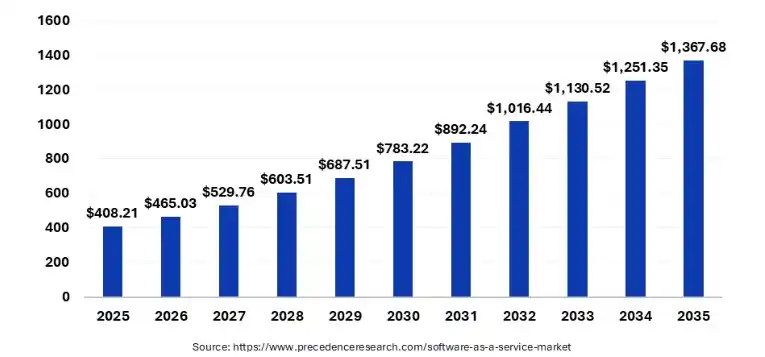
The global SaaS market hit $408.21 billion in 2025, according to Precedence Research, and it is projected to climb to $465.03 billion in 2026. A number like that explains something most business owners already sense without needing a report to confirm it: almost every tool running your company today lives in a browser, not on a hard drive. That shift from installed software to subscription-based, browser-accessed software answers what is SaaS in one sentence.
This blog covers SaaS platforms, CRM tools, and business software regularly, and I have personally tested dozens of these tools while reviewing them here. This guide walks through what Software as a Service actually means, how it works behind the scenes, and why almost every business you deal with today runs on it.
By the end of this guide, you will know the real definition, the pricing models, the pros and the real limitations nobody likes to mention, and how to pick the right SaaS tool for your own business.
What Is SaaS? A Simple Definition
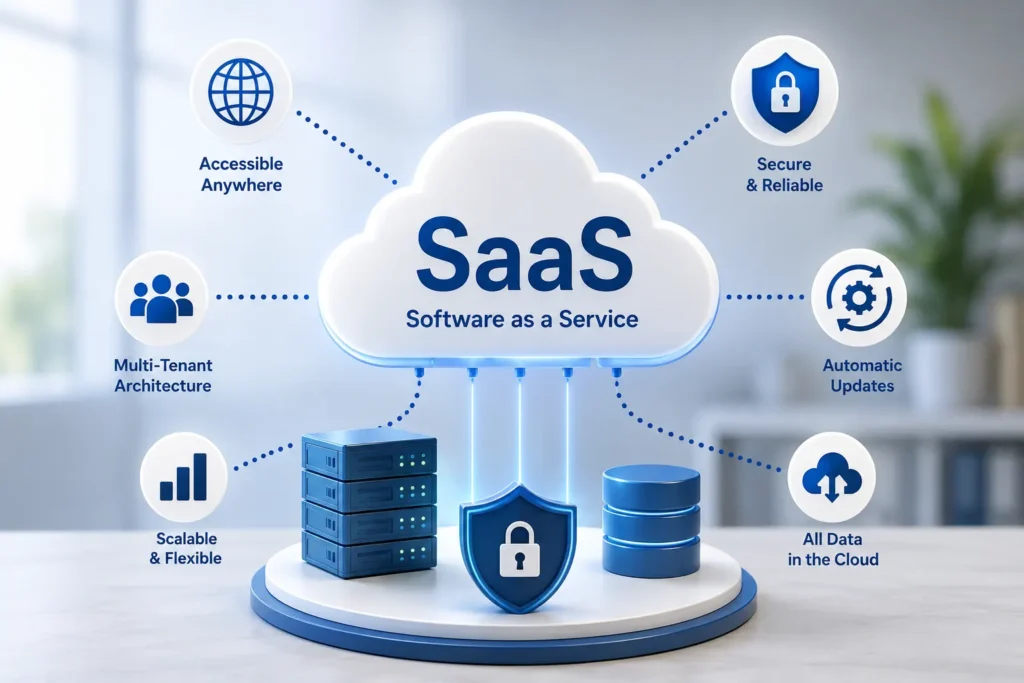
SaaS, short for Software as a Service, is a way of delivering software over the internet instead of installing it on your own computer or server. You open a browser, log in, and the application runs on the provider’s servers. The company that builds the software handles the hosting, security patches, backups, and updates. You just pay a subscription fee and use it.
Think about Gmail, Slack, Zoom, or Salesforce. You never download a setup file for any of these. You sign up, and the software is ready. That is cloud based software in its purest form, and it is the model almost every modern business tool follows now.
This is different from the old way of buying software, where a company purchased a license, installed it on physical servers, and had an internal IT team maintain it for years. That older approach is usually called on premise software, and I will get into that comparison shortly because it explains a lot about why SaaS won.
How Does SaaS Work Behind the Scenes
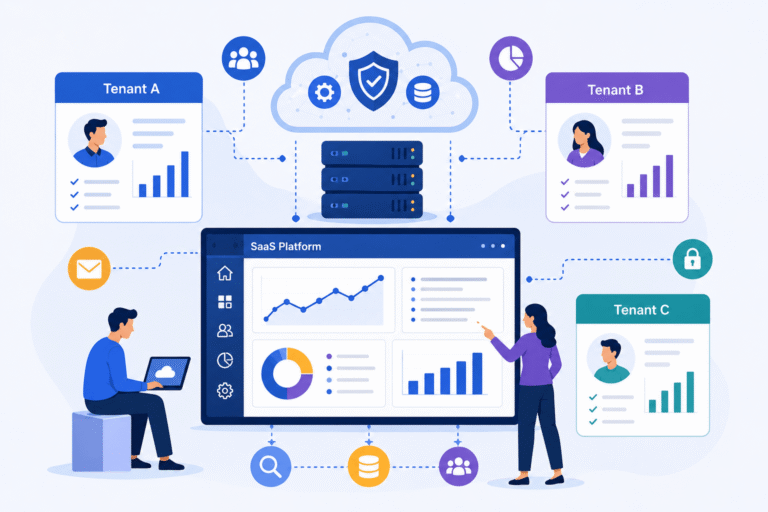
Most SaaS products run on what is called a multi tenant architecture. In plain terms, one version of the software serves many different customers at the same time, while keeping each customer’s data completely separate and invisible to everyone else. Instead of the provider running a separate copy of the app for every single client, everyone shares the same underlying infrastructure. That is exactly why SaaS companies can push new features to millions of users overnight instead of updating each customer one by one.
A few things happen every time you use a SaaS product:
- You log in through a browser or a lightweight app, no local installation needed.
- Your request travels to the provider’s cloud servers, often hosted on AWS, Microsoft Azure, or Google Cloud.
- The application processes your request and pulls your specific data from a shared but isolated database.
- The result comes back to your screen in seconds.
The provider handles server maintenance, uptime, security patches, and scaling. You handle logging in and getting your work done. That division of labor is the entire reason cloud computing changed how businesses buy technology.
SaaS vs Traditional Software vs PaaS and IaaS
People mix these terms up constantly, so let me separate them clearly, because this matters for search intent and because I get asked about it often.
SaaS (Software as a Service) gives you a finished application you can use right away. Think CRM tools, email marketing platforms, or accounting software.
PaaS (Platform as a Service) gives developers a platform to build and deploy their own applications without managing the underlying servers. Think Heroku or Google App Engine.
IaaS (Infrastructure as a Service) gives you raw computing power, storage, and networking, and you build everything on top of it yourself. Think AWS EC2 or Azure Virtual Machines.
On premise software, on the other hand, means you buy the software outright, install it on your own hardware, and your internal team is responsible for every update, security patch, and server crash. It usually costs more upfront and takes longer to set up, but some highly regulated industries still prefer it for control reasons.
If I had to summarize the difference in one line, SaaS is renting a fully built house, PaaS is renting land with the foundation already poured, and IaaS is just renting the empty land.
Key Features That Define a True SaaS Product
After testing and reviewing this many tools for this blog, I have noticed the same handful of traits show up in almost every legitimate SaaS product:
- Subscription based pricing, usually billed monthly or annually per user or per feature tier
- Automatic updates, so you are always on the latest version without lifting a finger
- Accessibility from any device with an internet connection and a browser
- Multi tenant infrastructure that keeps costs lower for everyone sharing the platform
- Built in scalability, meaning you can add more users or storage without buying new hardware
- Vendor managed security and compliance, though you still need to check what standards they actually follow
If a piece of software is missing most of these, it is probably not a real SaaS product, it is just a website with a login page.
Real World Examples of SaaS You Already Use
This is where the concept clicks for most people. You are likely using several SaaS tools right now without even labeling them that way:
- Salesforce for customer relationship management
- Microsoft 365 for documents, spreadsheets, and email
- Zoom for video meetings
- Slack for team communication
- HubSpot for marketing and sales automation
If your business runs on a SaaS CRM platform, chances are it works a lot like the ones I broke down in our deep dive on SaaS CRM tools and where AI is taking them next. And if you are trying to keep your customer records clean before they even enter that CRM, tools built around SaaS email verification, like the ones I compared in NeverBounce vs ZeroBounce, solve a very specific and very common problem.
Benefits of SaaS for Businesses
I have set up SaaS stacks for small teams and watched larger companies migrate away from legacy systems, and the benefits show up in a fairly consistent pattern:
Lower upfront cost. You are not buying servers or perpetual licenses. You pay as you go, which keeps cash flow predictable.
Faster setup. Most SaaS tools take minutes to sign up for, not weeks of installation and configuration.
Automatic maintenance. Bug fixes, security patches, and new features roll out without your team touching a single server.
Scalability on demand. Adding ten new employees to a SaaS tool usually means adjusting your subscription tier, not buying new hardware.
Access from anywhere. Remote and hybrid teams rely on this daily. Your data lives in the cloud, not on one office computer.
This is exactly why industries far outside traditional tech now depend on SaaS. Manufacturing businesses, for example, have shifted heavily toward cloud platforms for production planning and inventory, which I broke down in this roundup of SaaS software built specifically for manufacturing companies.
Common Challenges and Limitations of SaaS
I do not think it is fair to write about SaaS without being honest about its downsides, because I have run into all of these myself.
You depend on the vendor’s uptime. If their servers go down, your business tools go down with them.
Data lives outside your own infrastructure. For industries with strict compliance needs, this raises real questions about where data sits and who can access it.
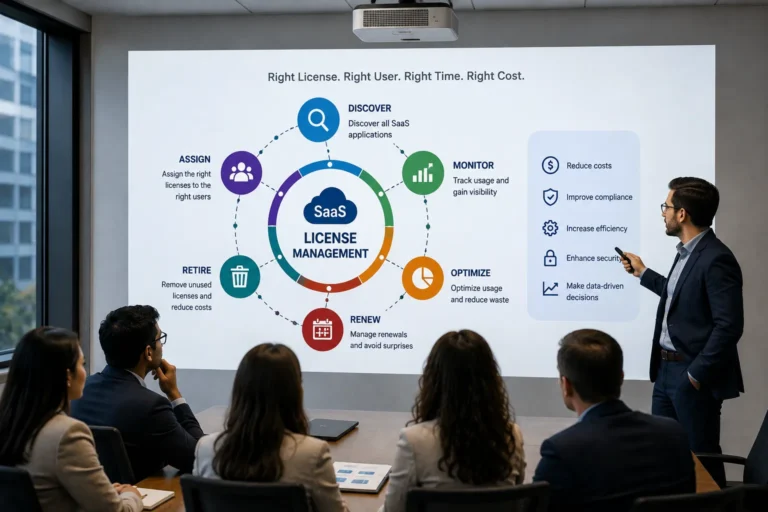
Subscription costs add up. A single tool at ten dollars a month feels harmless, but most companies now run dozens of SaaS subscriptions at once, and that total often surprises finance teams at renewal time.
Limited customization. Multi tenant platforms are built to serve everyone at once, so deep custom changes are harder than they would be on software you fully own.
Integration complexity. The more SaaS tools you add, the more you need them to talk to each other cleanly, which is often where things break.
None of these are reasons to avoid SaaS. They are reasons to choose vendors carefully and read the fine print on data handling and service level agreements.
SaaS Pricing Models Explained
Most SaaS companies price their product using one or a mix of these models:
Per user pricing. You pay a set fee for every person who logs into the account. This is the most common model for team tools like project management or CRM software.
Tiered pricing. Plans are grouped into packages such as Basic, Pro, and Enterprise, each unlocking more features or higher usage limits.
Usage based pricing. You pay based on how much you actually use, such as number of API calls, storage volume, or emails sent.
Freemium. A limited free version is offered to attract users, with paid upgrades for advanced features.
If you are evaluating tools for your own business, whether that is account management platforms or a full CRM suite, understanding the pricing model upfront saves you from bill shock later. I walked through this exact comparison process in my breakdown of the best account management software options.
SaaS Market Size and Growth in 2026
The scale of SaaS adoption today is genuinely hard to overstate, and the numbers back that up.
Statista reports that 99% of organizations now use at least one SaaS application. On the enterprise side, companies are spending an average of $4,200 per employee per year on SaaS tools, and 84% of organizations reported an increase in SaaS spending in 2025, based on industry survey data compiled by Zylo.
Gartner’s February 2026 forecast puts total worldwide IT spending at $6.15 trillion for the year, a 10.8% jump over 2025, with software named as the largest and fastest growing spending category. North America still holds roughly 47% to 48% of global SaaS revenue, largely because major vendors like Microsoft, Salesforce, and Adobe are headquartered there.
These figures move every year, and different research firms use slightly different definitions of what counts as SaaS, so treat any single number as a snapshot rather than a fixed truth. The direction, though, is consistent across every source: SaaS spending keeps climbing, and AI features are now baked into most new SaaS releases, which is pushing per-tool costs up even for existing customers.
How to Choose the Right SaaS Tool for Your Business
I always tell people to slow down before signing up for the first tool that shows up in a Google search. Here is the checklist I actually use when I am reviewing SaaS software for this blog:
- Define the exact problem first. Do not shop for features. Shop for a solution to one specific bottleneck.
- Check integration compatibility. Confirm it connects cleanly with the tools you already run, especially your CRM or accounting software.
- Read the security and compliance page. Look for certifications relevant to your industry, such as SOC 2 or GDPR compliance.
- Test the free trial with real data. A demo with sample data hides usability problems that only show up with your actual workflow.
- Calculate the real annual cost. Multiply the per-user price by your team size and add any add-on fees before comparing vendors.
- Ask about data export. Make sure you can pull your data out cleanly if you ever switch providers.
This same evaluation process applies whether you are picking a customer support tool powered by AI, which I covered in detail in why AI matters so much in customer service software, or a marketing assistant built around large language models, something I tested directly in using ChatGPT for SaaS marketing.
Frequently Asked Questions About SaaS
What does SaaS stand for?
SaaS stands for Software as a Service, a model where software is hosted online and accessed through a subscription instead of being installed locally.
Is SaaS the same as cloud computing?
Not exactly. Cloud computing is the broader category of delivering computing resources over the internet. SaaS is one specific type of cloud service, alongside PaaS and IaaS.
What is an example of SaaS?
Salesforce, Zoom, Slack, Microsoft 365, and HubSpot are all well known SaaS products used daily by millions of businesses.
Is SaaS cheaper than on premise software?
Usually yes for the initial setup, since you avoid buying hardware and licenses upfront. Over several years, though, subscription costs can add up, so it depends on your usage and company size.
How is SaaS data kept secure?
Reputable SaaS vendors use encryption, access controls, and regular security audits. Always check for certifications like SOC 2, ISO 27001, or GDPR compliance before trusting a vendor with sensitive data.
Can SaaS work offline?
Most SaaS products need an internet connection since the application runs on the provider’s servers. Some offer limited offline functionality that syncs once you reconnect.
What is multi tenant architecture in SaaS?
It means one version of the software serves multiple customers at once while keeping each customer’s data isolated and private, which is what allows SaaS vendors to scale efficiently.
Who owns the data in a SaaS application?
In almost every case, you own your data, but it is physically stored on the vendor’s servers. Always confirm data ownership and export rights in the vendor’s terms of service.
Is SaaS suitable for small businesses?
Yes, and it is often the better choice for small businesses specifically because it removes the need for an internal IT team or expensive server hardware.
How do I switch from one SaaS provider to another?
Export your data in a standard format, confirm the new vendor supports import, run both systems in parallel briefly to catch errors, then fully migrate once you have verified accuracy.
Final Thoughts
SaaS is not a trend anymore. It is the default way businesses buy and use software, and the market data shows that shift only accelerating through 2026. What started as a convenient alternative to installing software on office computers has turned into the standard operating model for everything from customer relationship management to accounting, marketing, and internal communication.
If you are choosing your first SaaS tool or auditing the dozen subscriptions your company already pays for, focus less on the flashiest feature list and more on real fit, security practices, and total cost over time. Vendors will always highlight their newest AI feature or their sleekest dashboard, but the questions that actually protect your business are quieter ones: Does this tool integrate with what you already use? Can you export your data if you leave? Does the pricing still make sense once you multiply it across your whole team?
That is the difference between a tool that quietly runs your business well and one that just adds another login to your list. The businesses getting the most out of SaaS in 2026 are not the ones chasing every new release, they are the ones that picked their tools carefully in the first place and reviewed them regularly instead of letting subscriptions pile up unchecked.