SaaS has changed how companies buy and use software. Instead of purchasing a program once and installing it on a company server, businesses can subscribe to cloud applications and give employees access within minutes. That convenience has made software easier to adopt, but it has also created a new management problem: companies need to know which applications they use, who has access, what licenses they have purchased, how much those licenses cost, and whether those licenses are actually being used.
The challenge is becoming more significant as software pricing and consumption models evolve. Gartner reported in July 2026 that up to $234 billion of enterprise application software spending globally is exposed to disruption from agentic AI through 2030, or roughly 20% of enterprise SaaS spending industry-wide, highlighting how the traditional seat-based SaaS model is changing.
As software environments become more complex, organizations need better visibility across applications, users, licenses, usage, contracts, and renewals. SaaS license management provides a structured approach to tracking and optimizing those resources while helping businesses make better software purchasing, access, and renewal decisions.
This guide explains what SaaS license management is, how it works, what businesses should track, how to identify unused and underused licenses, best practices for license optimization, important metrics, implementation steps, and how to evaluate SaaS license management software.
Table of Contents
ToggleWhat Is SaaS License Management?
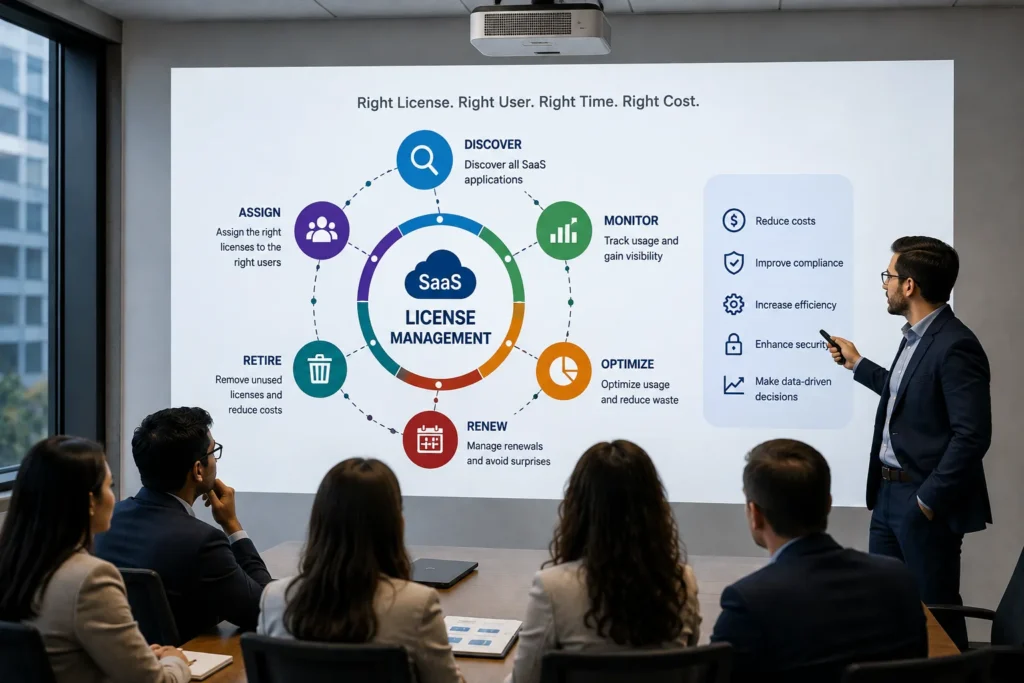
SaaS license management is the process of managing software subscriptions and licenses throughout their lifecycle. That lifecycle can include discovery, procurement, assignment, usage monitoring, optimization, renewal, and retirement.
A SaaS license gives a person or organization permission to use a cloud-based software service under defined terms. Licensing structures differ depending on the vendor. Some applications charge per user, while others use tiers, features, usage, or negotiated enterprise agreements.
The management challenge appears when a business has more than a few applications.
For example, imagine a company that buys 500 seats for a collaboration platform. Over time, employees leave, teams change, contractors finish projects, and some users stop using the application. The company may still be paying for the original number of seats even though actual usage has changed.
SaaS license management helps answer questions such as:
- How many licenses did we purchase?
- How many are assigned?
- How many are actually active?
- Which users have not used their licenses recently?
- Which departments are using the application?
- When does the contract renew?
- Are we paying for multiple tools with overlapping functionality?
- Are users signing up for software outside the approved purchasing process?
- Should we renew, reduce, upgrade, downgrade, or cancel the subscription?
The goal is not simply to reduce the number of licenses. Good management means having the right software, the right license type, the right number of licenses, and the right users at the right time.
For readers who are new to the broader SaaS model, our guide to what SaaS is and how it works provides the foundation behind subscription-based software and cloud delivery.
Why SaaS License Management Matters
SaaS makes software procurement faster, but that speed can create fragmented purchasing.
A department can sign up for a marketing platform, a sales team can purchase another application, an employee can start a free trial that becomes a paid subscription, and IT may not see the complete picture until renewal arrives.
The result is often a portfolio that is difficult to understand.
SaaS sprawl
SaaS sprawl happens when an organization accumulates more applications than it can effectively monitor. Some applications may be business-critical, while others are rarely used or duplicate capabilities already available elsewhere.
Unused licenses
A license can remain assigned to an employee who has stopped using the application. Without usage data, the organization may continue paying for that access.
Underused license tiers
Not every optimization decision is about removing a user. An employee may need the application but not the premium features included in their current plan.
Renewal risk
Subscriptions often renew on different dates. Without a centralized view, teams can miss important review windows and end up making renewal decisions at the last minute.
Security and access problems
A former employee should not retain unnecessary access to business applications. SaaS license management can support onboarding and offboarding processes by helping teams understand which applications and accounts belong to each user.
Procurement fragmentation
When applications are purchased by different teams, finance, procurement, IT, and department owners may each have a different picture of spending and ownership.
Current SaaS management research also points to increasing pricing complexity. Zylo’s 2026 research says 78% of surveyed IT leaders reported unexpected charges associated with AI features or consumption-based pricing during the previous year.
This makes license visibility more important because the old assumption that every SaaS bill is simply “price per employee” is no longer sufficient for every product.
How Does SaaS License Management Work?
A practical SaaS license management process can be viewed as a continuous lifecycle:
Discover → Inventory → Assign → Monitor → Optimize → Renew → Govern
1. Discover SaaS applications
The first step is understanding what software exists across the organization.
Applications can come from:
- IT procurement
- Finance and expense systems
- Identity providers
- Single sign-on systems
- Vendor integrations
- Employee self-service registrations
- Corporate credit cards
- Department-level purchases
ServiceNow’s current SaaS license management documentation describes SaaS discovery methods including vendor connections, SSO connections, software spend data, and endpoint-based discovery.
2. Build a SaaS license inventory
Once applications are discovered, the organization needs a centralized record.
Useful fields include:
- Application name
- Vendor
- License model
- Number of purchased licenses
- Number of assigned licenses
- Number of active users
- License cost
- Contract owner
- Business owner
- Renewal date
- Subscription period
- Department
- Access method
A centralized inventory creates a starting point for every later decision.
3. Map licenses to users
Knowing that a business owns 1,000 licenses is not enough. The organization should know who has those licenses and why.
Mapping users to licenses makes it easier to identify:
- Inactive users
- Former employees
- Duplicate accounts
- Temporary access
- Department-level demand
- Privileged users
- Users with premium plans
4. Monitor usage
Usage monitoring turns a static inventory into actionable information.
Depending on the application, relevant signals may include:
- Last login
- Login frequency
- Feature usage
- API activity
- Active days
- Assigned role
- License tier
- User status
Usage should be interpreted in context. A user who logs in once a month may still need the software if their role only requires it occasionally.
5. Identify optimization opportunities
After usage data is available, organizations can determine whether licenses should be:
- Kept
- Reassigned
- Reclaimed
- Downgraded
- Upgraded
- Consolidated
- Cancelled
The correct decision depends on business requirements, not a single activity threshold.
6. Review upcoming renewals
Renewal management is where license optimization connects directly with procurement.
Before renewal, teams can review:
- Current license count
- Active users
- Unused licenses
- Plan tiers
- New business requirements
- Contract terms
- Price changes
- Alternative applications
- Overlapping software
This gives the organization evidence for the renewal conversation.
7. Govern the portfolio continuously
SaaS license management should not be a once-a-year cleanup exercise.
Applications change. Employees move teams. Vendors alter pricing. New products enter the business. Existing applications add features.
A continuous process keeps the software portfolio aligned with actual needs.
What Does SaaS License Management Track?
A strong program can track information across five major areas.
Application information
This includes the software name, vendor, purpose, category, business owner, and department using it.
License information
Track the number of licenses purchased, assigned, available, active, and inactive.
User information
Connect software access to employees, contractors, teams, roles, and identity records.
Financial information
Capture subscription costs, billing frequency, purchase date, renewal date, contract value, and relevant cost centers.
Usage information
Monitor activity that helps determine whether licenses and plans are being used effectively.
This distinction matters because license count and license utilization are not the same thing.
A company could purchase 1,000 seats and assign all 1,000, yet still have a utilization problem if a significant portion of those accounts are inactive.
Understanding Different SaaS License Models
SaaS license management becomes easier when the organization understands how vendors charge for access.
Per-user or per-seat licensing
The company pays based on the number of users or seats.
This model is easy to understand, but it creates a direct relationship between headcount and software cost.
Tiered licensing
Different packages provide different features, limits, or levels of support.
The optimization question becomes more than “Do we need this license?” It can also become “Are we using enough of the functionality to justify this tier?”
Usage-based licensing
The customer pays according to actual consumption, such as transactions, API calls, storage, compute, or other measurable usage.
Usage-based pricing makes consumption data important during both budgeting and license management.
Feature-based licensing
Access depends on which capabilities the customer needs.
This is common when advanced security, analytics, administration, automation, or integration features are included only in higher plans.
Enterprise licensing
Large organizations may negotiate agreements covering multiple teams, business units, or applications.
These contracts can introduce additional considerations such as volume commitments, negotiated terms, service levels, security requirements, and renewal conditions.
ServiceNow’s documentation currently distinguishes Direct SaaS from Hybrid SaaS, with Hybrid SaaS combining cloud subscriptions with locally installed components.
Understanding these models matters because a license optimization strategy should reflect how the vendor actually charges.
SaaS License Management vs SaaS Management
The two terms are related, but they are not identical. SaaS license management focuses primarily on the control and optimization of licenses and subscriptions.
That includes:
- License allocation
- License usage
- User access
- License reclamation
- Renewal tracking
- License optimization
SaaS management is broader. It can include:
- Application discovery
- SaaS spending
- Procurement
- Vendor management
- Contracts
- Security
- Governance
- User lifecycle management
- Application rationalization
- License optimization
In practice, license management can be considered one important part of a larger SaaS management strategy.
SaaS License Management vs Software Asset Management
Software Asset Management, or SAM, covers the broader discipline of managing software assets, licensing, usage, compliance, and lifecycle processes.
SaaS license management focuses specifically on cloud-based software and subscriptions. The distinction becomes clearer when comparing environments.
A SAM program may need to manage:
- On-premises applications
- Installed software
- Perpetual licenses
- Maintenance agreements
- SaaS subscriptions
- Cloud software
- Hybrid licensing
SaaS license management deals more directly with subscription-based applications, users, access, usage, and recurring contracts.
The two approaches can work together. ServiceNow currently positions SaaS License Management within its Software Asset Management capabilities.
What Are the Benefits of SaaS License Management?
Better SaaS cost control
The first benefit is visibility. When teams know how many licenses they own, how many are active, and where spending occurs, they can make more informed purchasing decisions.
Higher license utilization
Unused licenses can sometimes be reassigned instead of purchasing additional seats.
The objective is not to maximize utilization at any cost. It is to align access with legitimate business needs.
Fewer unnecessary renewals
A renewal review can identify subscriptions that no longer justify their cost or applications that are no longer important to the business.
Better security
Knowing which employees have access to which applications improves visibility during onboarding, role changes, and offboarding.
Less SaaS sprawl
A centralized inventory makes duplicate applications easier to identify.
For example, different teams may be paying for several applications that perform similar functions. That does not automatically mean one should be cancelled, but it creates a question worth reviewing.
ServiceNow specifically highlights overlapping software discovery and unmanaged SaaS spend detection as capabilities within its current SaaS license management offering.
Better procurement decisions
Usage data can provide evidence when purchasing additional licenses or negotiating renewals.
Better accountability
Assigning application owners creates a clear responsibility for usage, budget, access, and renewal decisions.
How to Identify Unused and Underused SaaS Licenses
One of the most useful applications of SaaS license management is distinguishing between unused and underused licenses.
An unused license may be assigned to someone who has not accessed the application.
An underused license is more complicated. The person may use the application, but their usage might not justify a premium plan, large number of features, or higher-cost tier.
A practical audit can follow this process.
Step 1: Create a complete license list
Start with the number of licenses purchased and assigned.
Step 2: Add user activity
Connect each account to appropriate usage information.
Step 3: Review inactive accounts
Look for accounts that have been inactive for a meaningful period.
Do not use the same inactivity threshold for every application. A daily collaboration tool and an annual planning platform can have very different normal usage patterns.
Step 4: Review license tiers
Check whether users are actually using premium functionality.
Step 5: Confirm with application owners
Usage data should support the decision, not replace business context.
Step 6: Reclaim or reassign
Where appropriate, remove unnecessary access or move licenses to employees who need them.
Step 7: Record the decision
Document what changed and why.
This creates an audit trail and makes future reviews easier.
SaaS License Management Best Practices
A reliable program needs more than software. It needs a repeatable process.
Maintain a centralized inventory
Keep application, user, license, contract, and renewal information in one manageable system.
Assign ownership
Each major SaaS application should have a business or technical owner who understands why it exists and who depends on it.
Audit regularly
A regular review can reveal changes that a static annual inventory misses.
Review licenses before renewal
Do not wait until the renewal deadline to determine whether the current agreement still fits.
Monitor shadow IT
Employees can adopt SaaS applications without going through centralized procurement. Discovery processes should account for this possibility.
Integrate identity systems
Connecting SaaS management with SSO or identity platforms can improve visibility into users and access.
Create onboarding and offboarding workflows
New users need appropriate access, while departing users should have unnecessary access removed.
Track ownership and accountability
Without an owner, a subscription can continue simply because nobody is responsible for reviewing it.
Look at usage, not only cost
A cheaper license is not necessarily better if it prevents employees from completing important work.
Review application overlap
Two tools may overlap heavily enough that consolidation makes sense, but the decision should consider feature requirements, contracts, migration effort, and user impact.
EZO’s current guidance similarly emphasizes inventory creation, defined roles, renewal reminders, scheduled audits, contract review, and integration with the wider IT environment.
How to Implement SaaS License Management
Organizations do not need to transform their entire software environment in one step.
A practical implementation can follow seven stages.
Stage 1: Discover
Identify all SaaS applications and sources of software spending.
Stage 2: Centralize
Build an inventory of applications, licenses, users, costs, owners, and renewal dates.
Stage 3: Classify
Separate business-critical applications from low-priority, duplicate, unknown, or unauthorized software.
Stage 4: Analyze
Review license assignments, usage, subscription costs, and plan tiers.
Stage 5: Optimize
Reclaim inactive licenses, reassign available licenses, review plans, consolidate unnecessary applications, and prepare for upcoming renewals.
Stage 6: Govern
Define purchasing, access, security, ownership, and renewal policies.
Stage 7: Monitor
Repeat discovery and analysis so the environment remains accurate as the business changes.
This approach is more sustainable than doing a large cleanup once and then returning to manual tracking.
Should You Manage SaaS Licenses in a Spreadsheet?
A spreadsheet can be useful when an organization has a small SaaS portfolio.
It can record:
- Vendor
- Application
- License count
- Cost
- Owner
- Renewal date
- Notes
The problem appears as the number of applications, users, and renewal events increases.
Spreadsheets usually depend on people to update them. They may not automatically discover new applications, correlate user activity, or detect changes in identity systems.
A spreadsheet can therefore be a useful starting point, but it becomes less effective as the organization needs continuous discovery, usage analysis, workflow automation, and integrations.
What Features Should SaaS License Management Software Have?
Choosing a platform should start with the organization’s actual management problem.
Useful capabilities can include:
SaaS discovery
The platform should help identify applications that may not exist in the central software inventory.
License tracking
It should show purchased, assigned, available, and active licenses.
Usage analytics
Usage data should help teams understand whether applications and license tiers are being used appropriately.
Renewal management
The platform should surface upcoming renewals and provide enough context to review them before the deadline.
User lifecycle workflows
Provisioning, deprovisioning, and access changes can become more consistent when they are connected to identity and HR workflows.
Spend visibility
Finance and procurement teams need a view of software costs, contracts, and purchasing activity.
Application overlap detection
Software with overlapping functionality can be flagged for further review.
Integrations
Connections with identity providers, financial systems, procurement platforms, and SaaS vendors can improve the quality of the data.
Reporting
Reports should be useful for IT, procurement, finance, application owners, and leadership rather than simply displaying raw license counts.
ServiceNow currently highlights dashboards, direct integrations, SaaS license connections, SSO connections, overlapping software discovery, financial spend detection, and SaaS discovery among its capabilities.
Spendflo’s current 2026 guide also highlights features such as application discovery, usage monitoring, license optimization, access controls, renewals, and centralized SaaS information across the tools it reviews.
How to Measure SaaS License Management Success
License management should have measurable outcomes.
Here are some useful KPIs.
License utilization rate
License Utilization Rate = Active Licenses ÷ Purchased Licenses × 100
This provides a high-level view of how much purchased capacity is actively being used.
Unused license rate
Unused License Rate = Unused Licenses ÷ Purchased Licenses × 100
This helps identify potential waste, although an unused license is not automatically unnecessary. A company may intentionally maintain spare capacity.
Cost per active user
This can help compare actual software spending with active usage.
Reclaimed licenses
Track how many licenses are recovered and made available for reassignment.
Renewal savings
Record reductions achieved through rightsizing, plan changes, consolidation, or cancellation.
Applications without owners
A declining number of applications without accountable owners can indicate stronger governance.
Shadow IT discovery
Track how many unmanaged applications are identified and how many are brought into an approved process.
The important point is to avoid focusing on one KPI alone. A business that simply reduces licenses could create access problems. The better goal is to balance cost, usage, productivity, security, and business requirements.
A Practical SaaS License Management Example
Consider a hypothetical company with 750 employees.
The business uses several hundred SaaS applications across sales, marketing, finance, HR, engineering, customer support, and operations.
During a license review, the company discovers:
- Several applications have licenses assigned to former employees.
- Some premium licenses are assigned to users who only need basic functionality.
- Two departments use separate tools for similar workflows.
- Several renewal dates are only a few weeks away.
- A number of applications were purchased directly by departments and were not present in the central software inventory.
The company does not automatically cancel everything that appears unused. Instead, it follows a structured process.
First, it verifies account ownership and usage. Next, application owners confirm business requirements. Unnecessary accounts are removed, available licenses are reassigned, and license tiers are reviewed. The two overlapping applications are assessed for consolidation, and renewal discussions begin with updated usage information.
The outcome is not simply “fewer licenses.” The real outcome is better visibility and better decision-making.
That distinction is important because effective SaaS license management is about optimizing the software environment, not cutting technology spending blindly.
Common SaaS License Management Mistakes
Tracking purchases but not usage
Knowing how much software was bought does not tell you whether it is delivering value.
Relying permanently on manual spreadsheets
Manual records can become outdated quickly as users and applications change.
Treating every inactive account the same way
Usage patterns differ by application and role.
Ignoring departmental purchases
SaaS adopted outside central IT can create visibility gaps.
Waiting until renewal week
Contract and usage reviews should happen well before renewal.
Focusing only on seat count
License tier, feature utilization, contracts, and actual business needs also matter.
Forgetting ownership
Every significant application should have someone responsible for reviewing its value and lifecycle.
Using cost reduction as the only goal
A license is not waste simply because it is not used every day. The correct question is whether the organization needs the access and whether the cost is justified.
How SaaS License Management Fits Into a Broader SaaS Strategy
SaaS license management should not operate separately from the rest of the software lifecycle.
It connects with:
SaaS procurement: What software should the business buy?
spending: What is the organization actually paying?
SaaS governance: Which tools are approved and who owns them?
Identity management: Who has access?
Security: Is that access appropriate?
Contract management: What are the renewal and commercial terms?
Application rationalization: Which applications should remain?
Business performance: Is the software supporting the outcomes the company expects?
This is why SaaS license management becomes more valuable as SaaS adoption expands. It creates a connection between what an organization purchases and how those applications are actually used.
For broader SaaS business concepts, our resources on SaaS pricing models and essential SaaS metrics can help readers understand the financial and performance side of the SaaS model.
Businesses evaluating broader software strategies can also explore our guide to SaaS vs PaaS and our explanation of B2B SaaS.
When Should a Business Invest in SaaS License Management Software?
Manual processes may be enough when a company has a very small number of applications and simple purchasing.
A dedicated SaaS license management platform becomes more relevant when:
- The SaaS portfolio is growing quickly
- Multiple departments purchase software
- Renewal dates are difficult to track
- SaaS spending is becoming difficult to understand
- Teams cannot easily identify unused licenses
- IT lacks visibility into employee SaaS access
- The organization is experiencing SaaS sprawl
- Manual audits consume significant time
- Security and governance requirements are increasing
- Usage data is needed for renewal negotiations
The right point to adopt software depends on the complexity of the environment, not on a specific number of applications.
Frequently Asked Questions About SaaS License Management
1. What is SaaS license management?
SaaS license management is the process of tracking, assigning, monitoring, optimizing, and renewing licenses for cloud-based software applications. It helps businesses understand which licenses they own, who is using them, how frequently they are used, when contracts expire, and whether the current license allocation matches actual business requirements and software usage.
2. Why is SaaS license management important?
SaaS license management gives businesses visibility into their software subscriptions, license allocation, user access, usage, and renewal dates. This visibility can help identify unused or underused licenses, improve software utilization, support better purchasing decisions, strengthen access governance, and reduce unnecessary subscription expenses without removing software that employees genuinely need.
3. How does SaaS license management work?
SaaS license management typically starts with discovering applications and creating a centralized inventory. Businesses then record license quantities, users, costs, contracts, and renewal dates. Usage data is analyzed to identify inactive or underused licenses. Organizations can then reclaim, reassign, downgrade, renew, or cancel licenses according to actual business requirements.
4. What is SaaS license optimization?
SaaS license optimization means aligning software licenses with current business needs and actual usage. It can involve removing inactive accounts, reallocating available licenses, changing license tiers, adjusting subscription quantities, or reviewing overlapping applications. The objective is not simply to reduce license counts, but to achieve an appropriate balance between cost, access, productivity, and utilization.
5. How can businesses identify unused SaaS licenses?
Businesses can identify unused SaaS licenses by reviewing user activity, last login dates, application usage, assigned roles, license status, and feature utilization. However, low activity does not always mean a license is unnecessary. Teams should consider the employee’s responsibilities and business requirements before reclaiming, downgrading, or removing access.
6. What is the difference between SaaS license management and SaaS management?
SaaS license management focuses mainly on licenses, users, allocations, usage, optimization, and renewals. SaaS management covers a broader area that can include application discovery, spending, procurement, contracts, security, governance, vendor management, and user lifecycle processes. License management is therefore commonly treated as one component of a broader SaaS management strategy.
7. What features should SaaS license management software have?
SaaS license management software should provide capabilities for application discovery, license tracking, user-level visibility, usage analytics, renewal monitoring, license optimization, spending analysis, reporting, and access management. Useful integrations can connect the platform with identity providers, procurement systems, financial tools, HR systems, and SaaS applications to improve data accuracy and workflow automation.
8. Can SaaS license management reduce software costs?
SaaS license management can help businesses identify potential savings by locating unused licenses, unnecessary subscriptions, duplicate applications, and mismatched license tiers. It can also improve renewal preparation by giving procurement teams better usage information. Actual savings vary depending on the organization’s contracts, software portfolio, licensing models, employee usage, and existing purchasing processes.
9. How often should SaaS licenses be reviewed?
SaaS licenses should be reviewed regularly because users, software requirements, subscriptions, and pricing can change throughout the year. Businesses with rapidly changing SaaS environments may benefit from more frequent monitoring, while stable organizations may use scheduled reviews. License usage should also be reviewed before renewals so decisions are based on current business needs.
10. What is the best way to manage SaaS licenses?
The best approach combines centralized SaaS discovery, accurate license inventory, usage monitoring, application ownership, regular audits, renewal planning, access controls, and continuous optimization. Businesses should evaluate licenses according to actual usage and business requirements rather than relying only on purchased quantities. Dedicated SaaS management software can automate these processes as complexity increases.
Conclusion
SaaS license management is more than keeping a list of subscriptions. It connects applications, users, licenses, usage, costs, contracts, renewals, and access into a process that helps businesses understand what they own and how it is being used. As SaaS portfolios become more complicated, visibility becomes increasingly important for IT, procurement, finance, security, and department leaders.
The strongest approach is continuous rather than reactive. Discover applications, maintain an accurate inventory, monitor usage, review license requirements, prepare for renewals, and establish clear ownership. With the right process and supporting tools, organizations can make more informed SaaS decisions without sacrificing the software access employees need to do their jobs.